
 German
 Japanese
 Portuguese
 Korea
Korea
 Mexico
 Dutch
Dutch


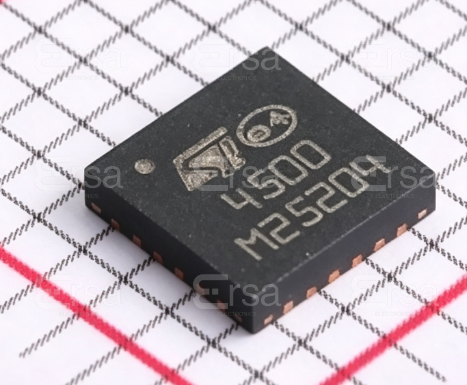

STMicroelectronics
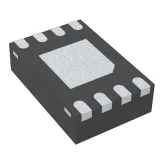
STUSB4500QTR
736-STUSB4500QTR

PDF Datasheet
USB PD Controller IC - Standalone, Power Sinking
20 Weeks

Why Choose Us?
Professional Platform
B2B & B2C purchasingDelivery at full speed
1-2 days deliveryWide variety
Original manufacturers365 days guarantee
Responsible quality

.png)



Tech Specifications
Manufacturer
STMicroelectronics
Series
-
Packaging
Tape & Reel (TR) / Cut Tape (CT)
Part Status
Active
Protocol
USB
Function
Controller
Interface
I2C
Standards
USB 2.0
STUSB4500QTR Description
The STUSB4500QTR is a USB Type-C™ interface converter from STMicroelectronics. It is designed to convert USB Type-C signals to USB Type-A and vice versa, enabling the connection of USB Type-A devices to USB Type-C ports and USB Type-C devices to USB Type-A ports.
Features of the STUSB4500QTR include:
1. USB Type-C interface converter: The STUSB4500QTR is designed to convert USB Type-C signals to USB Type-A and vice versa, allowing for compatibility between devices with different USB connectors.
2. Support for USB Power Delivery (PD): The STUSB4500QTR supports USB PD, which allows for efficient power delivery between devices.
3. Support for USB data transfer: The STUSB4500QTR supports USB data transfer rates of up to 5 Gbps, allowing for fast and efficient data transfer between devices.
4. Small form factor: The STUSB4500QTR is designed to be compact and easy to integrate into a wide range of devices.
Applications of the STUSB4500QTR include:
1. USB Type-C to USB Type-A adapters: The STUSB4500QTR can be used to create adapters that allow USB Type-A devices to be connected to USB Type-C ports.
2. USB Type-A to USB Type-C adapters: The STUSB4500QTR can also be used to create adapters that allow USB Type-C devices to be connected to USB Type-A ports.
3. USB Type-C hubs: The STUSB4500QTR can be used to create USB Type-C hubs that support multiple USB Type-A and Type-C devices.
4. USB Type-C docking stations: The STUSB4500QTR can be used to create USB Type-C docking stations that support USB Type-A and Type-C devices, as well as other peripherals such as displays and keyboards.
Overall, the STUSB4500QTR is a versatile and compact USB Type-C interface converter that enables compatibility between USB Type-A and Type-C devices, making it a useful tool for a wide range of applications.
FAQ
Is STUSB4500QTR currently in stock?
Yes. STUSB4500QTR currently shows 4295 unit(s) in stock.
What operating temperature range does STUSB4500QTR support?
What is the standard lead time for STUSB4500QTR?
Are there related or alternative parts for STUSB4500QTR?
Does STUSB4500QTR have quantity-based pricing?
Availability
(In Stock :
4295 )
| Quantity | Unit Price | Ext. Price |
|---|---|---|
| 1+ | $2.68430 | $2.68 |
| 10+ | $2.29660 | $22.97 |
| 30+ | $2.05350 | $61.61 |
| 100+ | $1.80380 | $180.38 |
| 500+ | $1.69210 | $846.05 |
ADD TO CART
QUICK ORDER
Unit Price $2.68430
Subtotal $2.68
Quick Quote
ADD TO RFQ LIST
Not available to buy online? Want the lower wholesale price? Please Send RFQ to get best price, we will respond immediately
QUICK RFQ











.png?x-oss-process=image/format,webp/resize,h_32)


